
Android updates are no longer only about system performance or small design changes.
They are increasingly about the apps people use every day: phone calls, photos, sharing, search, reading and family safety.
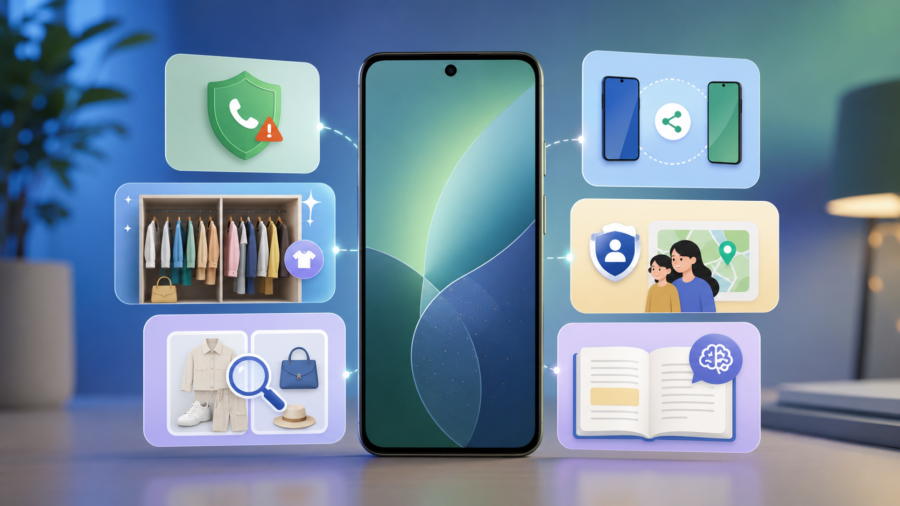
Google’s June Android Drop shows that clearly. The latest update brings a mix of practical features, including fake call detection in Phone by Google, a digital wardrobe tool in Google Photos, expanded Circle to Search outfit recognition, improved Quick Share compatibility and new safety features for children.
For ordinary users, the update is not about one big redesign. It is about making Android feel more helpful in everyday moments.
Some features protect users from scams. Some help organize personal photos and clothing. Some make sharing easier across devices. Others make reading and family safety more useful.
That is why this Android Drop matters: it shows how smartphone apps are becoming smarter, more personal and more protective.
What is the June Android Drop
The June Android Drop is a set of new Android features rolling out across supported devices and Google apps.
Google says the update focuses on personalization and safety, with features designed to help users plan outfits, avoid fake calls, share with iPhone users and get more from Android apps.
Android feature drops are important because they often bring new capabilities without requiring users to wait for a full annual Android version upgrade.
That means some users may receive useful app improvements through updates to Google apps, Play services or supported system components.
As always, availability depends on region, device, Android version and app support.
Fake call detection is the most important safety feature
The most serious feature in this update is fake call detection.
Google says Phone by Google can now warn users when a scammer may be pretending to call from a trusted contact’s number. The feature is designed to help protect people from impersonation scams, including AI voice-cloning scams.
This matters because scam calls are becoming more convincing.
A caller ID may show a familiar contact. A voice may sound emotional or urgent. A scammer may claim there is an emergency and ask for money, codes or personal information.
Fake call detection adds a warning layer at the exact moment users need it.
The feature does not stop every scam, and it has compatibility limits. It works when both sides use supported Google communication tools, including Phone by Google and RCS-based verification. But even with limits, it is an important step because caller ID alone is no longer enough.
Why this matters in the AI voice scam era
AI voice scams are dangerous because they attack trust.
People are more likely to react quickly when a caller appears to be a family member, friend or trusted contact. If the voice sounds real, the pressure becomes stronger.
Google’s fake call detection is designed to interrupt that moment by warning users when a call may not be genuinely coming from the person shown on the screen.
The safest habit is still simple: if a call asks for money, codes or urgent action, hang up and verify through another method.
But a phone-level warning can make that pause more likely.
Google Photos is getting a digital wardrobe
The more lifestyle-focused part of the update is Google Photos’ digital wardrobe feature.
Google says users can plan outfits in Google Photos as part of the June Android Drop. The feature is designed to help users organize clothing from their photo library and use AI-powered tools to plan looks.
9to5Google reports that the wardrobe feature is rolling out first for eligible users in the United States, India and Brazil, and that it can analyze clothing from a user’s photo library to create a catalog for mixing, matching and virtual try-on.
This is a good example of AI moving into normal phone apps.
Instead of asking users to open a separate fashion app, Google is adding personal styling features to the photo library people already use.
That could be useful for planning outfits, reusing clothes, packing for trips or getting ideas from what is already in your closet.
Circle to Search can now find a full look
Circle to Search is also becoming more useful for fashion and shopping-style discovery.
Google’s update expands the ability to find an entire look, not just one item.
Android Authority reports that Circle to Search’s multi-object outfit identification is expanding to compatible Android 14 devices, while Google Photos launches its Digital Wardrobe feature separately.
This means users may be able to identify multiple clothing items from a single image or screen.
For example, instead of searching for only a jacket, the system may help identify the overall outfit style. That makes visual search feel more natural because people often want the whole look, not just one product.
This also shows how search is changing inside mobile apps. Users no longer need to describe everything with words. They can search from what they see.
Quick Share is becoming more useful across devices
Sharing between Android and other devices has historically been a pain point.
Google’s June Android Drop expands Quick Share compatibility, including support for sharing with iPhone devices in more situations.
Android Central reports that Google is expanding AirDrop-like Quick Share functionality to more Android devices, allowing easier file sharing with iOS devices without needing an internet connection in supported cases.
This is practical because people rarely live inside one device ecosystem.
A family may include Android phones, iPhones, Windows laptops and tablets. Friends may use different devices. Travel groups often need to share photos quickly after a trip.
If Quick Share becomes more reliable across ecosystems, Android will feel less isolated.
Personal Safety expands for children
The update also includes safety features for younger users.
Android Central reports that children under 13 can now add medical information and emergency contacts to the lock screen through the Personal Safety app, with support for features such as car crash detection, real-time location sharing and Safety Check where available.
This is a quieter feature, but it may be important for families.
Smartphones are often part of children’s daily life. Safety features that help parents and emergency contacts respond more quickly can be valuable, especially during travel, school activities or summer routines.
As with all child safety tools, parents should review settings carefully and explain how the features work.
Google Play Books gets smarter reading tools
The June Android Drop also includes updates to Google Play Books.
Thurrott reports that Google Play Books is rolling out a Book Insights feature with a “Catch me up” recap and the ability to highlight passages and ask questions, starting in English for select titles.
This fits a broader trend: reading apps are becoming more interactive.
Instead of only displaying pages, apps can help users return to a book after a break, remember key points or ask questions about highlighted sections.
For students, casual readers and people who read across multiple devices, this could make digital reading easier.
But users should still remember that AI summaries may not replace careful reading, especially for study, legal, academic or technical material.
Why Android updates now feel more app-focused
This feature drop shows how Android updates are changing.
Instead of focusing only on system-level changes, Google is improving everyday app experiences.
Phone by Google gets scam protection. Google Photos gets wardrobe planning. Circle to Search gets better visual discovery. Quick Share gets better cross-device sharing. Personal Safety gets more family features. Play Books gets smarter reading support.
The operating system and the apps are becoming more connected.
For users, this is what matters. A phone feels better when the apps people use every day become safer and more useful.
Which users benefit the most
Different users benefit from different parts of the update.
People worried about scams may care most about fake call detection.
Fashion and shopping users may like Google Photos’ wardrobe and Circle to Search’s outfit recognition.
Families may value Personal Safety updates for children.
People who share photos and files across mixed devices may care about Quick Share.
Readers may benefit from Play Books insights.
This is why the update is useful as a bundle. It does not depend on one feature being relevant to everyone.
What users should check before expecting the update
Not every feature will appear for every user at the same time.
Feature availability can depend on Android version, device brand, app version, country and account eligibility.
Fake call detection requires supported Google communication tools. Google Photos’ wardrobe feature is rolling out in specific countries first. Circle to Search requires compatible devices. Quick Share expansion depends on supported hardware and software.
Users should keep Android system updates, Google Play services and core Google apps updated.
If a feature does not appear immediately, it may still roll out later.
Why this update is good for the Apps category
The June Android Drop is not just a tech update. It is an apps story.
The biggest changes happen inside the apps people already use: Phone, Photos, Search, Quick Share, Personal Safety and Play Books.
This is the direction mobile platforms are moving.
Apps are becoming more intelligent, more connected and more aware of user context. AI is becoming less visible as a separate product and more visible as a feature inside everyday tools.
That makes the update important for Android users and for anyone watching how mobile apps are evolving.
The bigger takeaway
Android’s June Feature Drop shows how Google is using app updates to make phones safer, smarter and more personal.
Fake call detection addresses a serious new scam risk. Google Photos’ digital wardrobe and Circle to Search make visual discovery more useful. Quick Share improves cross-device convenience. Personal Safety gives families more tools. Play Books adds smarter reading support.
None of these features alone changes Android completely.
But together, they show a clear trend: the phone is becoming more proactive.
Instead of waiting for users to manage everything manually, Android apps are starting to warn, organize, suggest, summarize and connect.
That is the real story behind the June Android Drop.
Comments
You can write your views about this story. Comments may be moderated according to site settings.