
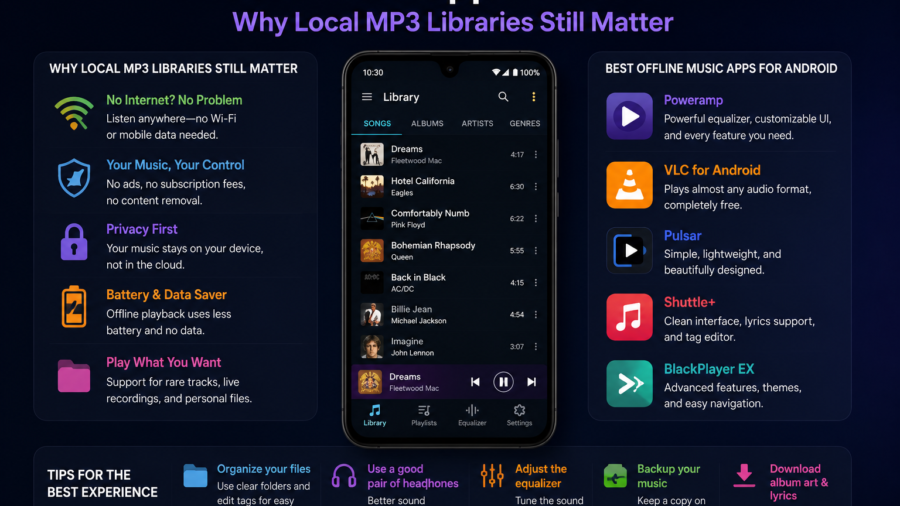
Streaming has changed the way people listen to music, but offline music apps still matter on Android.
For many users, music is not only about opening a streaming app and pressing play. Some people keep MP3 files on their phone. Some save authorized audio for travel. Some manage personal recordings, royalty-free tracks, podcasts, lectures or music files they already have permission to store.
That is where a local music library becomes useful.
An offline music app helps users play audio without depending on mobile data, weak Wi-Fi or a subscription connection. It also gives more control over files, folders, playlists and storage.
On Android, this can be especially practical because users can manage media files more directly than on some other platforms.
For Android users who want a simple way to manage authorized music, MP3 and video files, Lynka is available on Google Play.
The important point is simple: offline music apps are not about replacing every streaming service. They are about giving users a clean way to manage media they are allowed to save, play and organize.
Why Offline Music Still Matters
Offline music is useful because internet access is not always perfect.
People travel. They commute underground. They fly. They visit places with weak signal. They try to save mobile data. They may also want certain audio files available without worrying about connection problems.
A local MP3 library solves that problem.
When music is stored on the phone, it can be played without buffering or network delays. This is helpful for road trips, workouts, study sessions, flights and long journeys.
Offline music also gives users more control. You know which files are on your device. You can organize them into folders. You can create playlists that do not depend on an online account. You can keep personal or authorized audio in one place.
That control is one reason offline music apps still have a place on Android.
Local MP3 Libraries Are Easier to Control
A local MP3 library is simple in a way many online services are not.
You have the file. You know where it is saved. You can rename it, move it, delete it, add it to a playlist or back it up.
This can be useful for users who keep audio from different sources. For example, someone may have personal voice recordings, study audio, royalty-free music, public domain tracks or music files they purchased or created.
Without a good app, those files can become messy.
A strong offline music app should make the library easier to understand. It should show songs clearly, support folders, let users search quickly and make playback feel smooth.
The best local music experience is not complicated. It is clean, fast and predictable.
Offline Music Apps Help With Travel
Travel is one of the strongest reasons to keep offline music on Android.
When you are traveling, you may not want to rely on mobile data. Roaming can be expensive. Wi-Fi can be unreliable. Some places may have no signal at all.
Offline playlists make the trip easier.
You can prepare music before leaving, organize audio by mood or activity and listen without worrying about connection issues. This is useful for flights, buses, trains, hotels, beaches, road trips and long airport waits.
It is also useful for travelers who save language lessons, guided audio, podcasts or personal files.
A travel playlist does not need to be large. Even a small offline library can make a phone feel more useful when the internet is weak.
Storage Control Is Important
Offline music is helpful, but it can also fill a phone if users are not careful.
MP3 files are usually smaller than videos, but a large music library can still take up space. Converted files, duplicate tracks, old downloads and forgotten folders can quietly grow over time.
This is why a good offline music app should help users stay organized.
Users should be able to see their saved files, manage folders and remove audio they no longer need. A download history or recently added section can also help users clean up old media.
Storage control is especially important if the app also handles video files or MP3 conversion.
A simple habit helps: review your offline library once a month. Delete duplicates, remove old files and keep only what you actually use.
Playlists Make Offline Music More Useful
Playlists turn a folder of audio files into a usable library.
A good offline music app should make playlist creation simple. Users should be able to add tracks quickly, remove songs without deleting the original file and create playlists for different situations.
Common playlist ideas include:
Travel
Workout
Study
Relaxing
Favorites
Podcasts
Road trip
Offline listening
The goal is not to create a perfect music archive. The goal is to make listening easier.
A local music library becomes much more useful when users do not have to search for every track manually.
Favorites and Recently Played Media Help
Favorites are useful because people often return to the same songs or audio files.
A favorites feature gives users a fast way to collect the tracks they like most. Recently played media is also helpful because it lets users return to what they were listening to without searching again.
These small features matter in everyday use.
A music app should not make users work too hard. It should remember recent activity, make common actions easy and help users find what they want quickly.
This is especially important for people with large offline libraries.
When an app supports favorites, playlists and recently played media, it becomes easier to enjoy local files without feeling lost.
MP3 Conversion Can Be Useful, but Permission Matters
Some apps let users convert eligible media into MP3.
This can be useful when someone has a file they are allowed to convert, such as a personal recording, creator-approved media, royalty-free content, public domain audio or another authorized file.
But permission matters.
Users should not convert copyrighted, private, DRM-protected or streaming-only content without the right to do so. A file being available online does not automatically mean it can be saved or converted.
The safest rule is simple: only save or convert media you have the legal right to use.
A responsible offline music app should help users manage authorized files, not encourage risky downloading or copyright problems.
Why Metadata Matters
Metadata is the information attached to an audio file.
It can include the title, artist, album, cover image and other details. When metadata is clean, the music library looks organized. When it is messy, songs may appear with strange file names, missing artists or unknown albums.
For users with many MP3 files, metadata editing can be helpful.
Fixing a title or artist name makes search easier. Adding cover information can make the library feel cleaner. Organizing files properly also helps playlists and favorites look better.
Not every user needs advanced editing, but basic media details can make a big difference.
A good offline music library is not only about having files. It is about knowing what those files are.
Offline Music Is Also About Privacy and Control
Offline music gives users more control over their listening habits.
When files are stored locally, users do not always need an online account, constant connection or streaming history. That can appeal to people who prefer simple local playback.
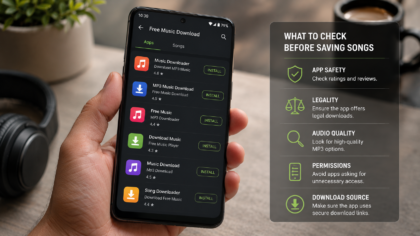
This does not mean offline apps are automatically private. Users should still check app permissions, privacy policies and data safety information before installing any app.
A music app may need access to media files so it can play audio. But it should not ask for unrelated permissions without a clear reason.
A trustworthy app should be clear about what it does and how it handles user data.
What to Look for in an Offline Music App
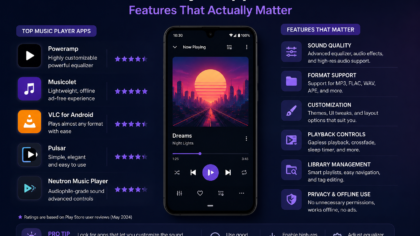
A good offline music app should be simple, reliable and easy to understand.
Look for clear local file playback, folder browsing, playlist support, favorites, search, recently played media and storage-friendly organization. If the app supports video or MP3 conversion, it should explain that users should only work with authorized media.
The interface should not feel crowded. Playback controls should be easy to reach. The app should work without constant internet access when playing local files.
Dark mode can also be useful for night listening.
The best app is not always the one with the longest feature list. It is the one that helps you enjoy your own media without confusion.
What to Avoid
Avoid apps that make unsafe promises.
If an app suggests that any song can be downloaded for free from anywhere, that is a warning sign. Users should be careful with apps that encourage saving copyrighted content without permission.
Also avoid apps with confusing buttons, aggressive pop-ups, unclear file locations or permissions that do not match the app’s purpose.
A good offline music app should feel transparent. It should make it clear where files are saved, what features are offered and what kind of media use is allowed.
Responsible media management is better than risky downloading.
How to Keep Your Offline Library Clean
A clean offline music library is easier to enjoy.
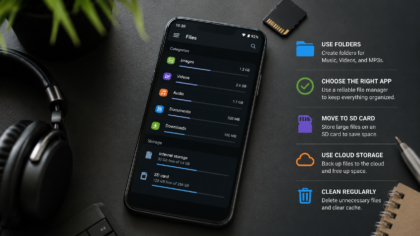
Start by creating simple folders. Keep music, podcasts, converted MP3s and personal recordings separate. Rename important files so you can find them later. Delete duplicate tracks. Remove files you no longer listen to.
If you use playlists, review them occasionally. Old playlists can become cluttered too.
Back up important personal audio before deleting anything. Some files are easy to replace, but personal recordings may not be.
A small monthly cleanup can prevent your phone from filling up.
Final Takeaway
Offline music apps still matter on Android because they give users control.
They make it easier to play local MP3 files, manage authorized audio, build playlists, save favorites and listen without depending on a constant internet connection.
For travelers, students, commuters and anyone who keeps personal or authorized media on a phone, a clean offline music app can make daily listening easier.
But responsible use matters.
Only download, save, convert or organize music and media you have permission to use. Avoid copyrighted, private, DRM-protected or streaming-only content unless the source clearly allows it.
A good offline music app should help users build a simple, organized and copyright-safe music library.
That is why local MP3 libraries still matter — not because streaming is going away, but because many Android users still want their own files available anytime.
Comments
You can write your views about this story. Comments may be moderated according to site settings.