
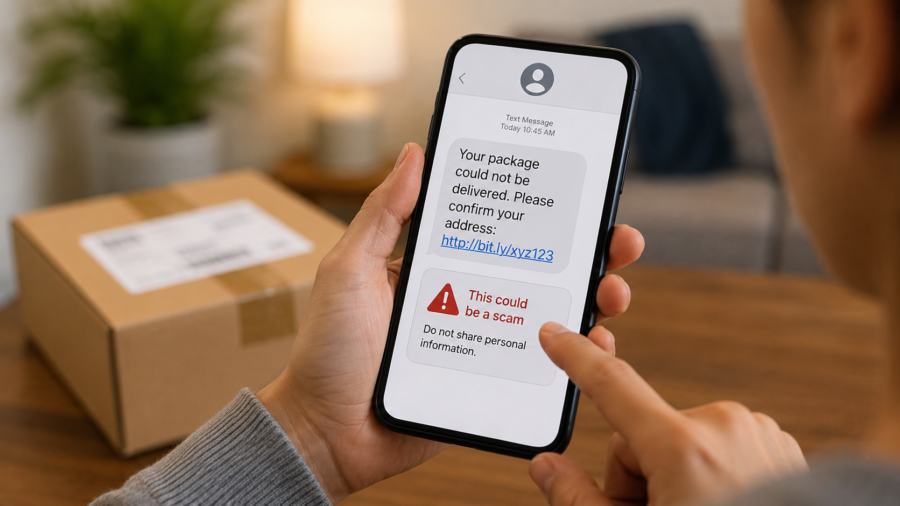
A package delivery text can feel harmless.
You are waiting for an order. Your phone buzzes. The message says there is a problem with your address, a missed delivery, an unpaid fee or a tracking update. There is a link, and it looks like the fastest way to fix the issue.
That small moment is exactly why fake delivery texts work.
These scams often arrive when people are busy, distracted or genuinely expecting something in the mail. The message does not need to be perfect. It only needs to look believable enough for a few seconds.
Security agencies and consumer protection groups have been warning about these messages for years. The U.S. Federal Trade Commission advises people not to click links or give information through unexpected delivery texts. The U.S. Postal Inspection Service describes this kind of scam as smishing, which is phishing carried out through text messages. The UK’s National Cyber Security Centre also tells users to report suspicious texts, while Australia’s Scamwatch has warned people to stop and think before tapping delivery links.
The good news is that most fake package texts share similar warning signs. Once you know what to look for, they become much easier to handle calmly.
What Is a Fake Package Delivery Text?
A fake package delivery text is a message that pretends to come from a delivery company, postal service, online store or courier.
The goal is usually simple: get you to tap a link.
That link may lead to a fake tracking page, a fake payment page, a fake login screen or a page that asks for personal information. Some messages may claim you need to pay a small redelivery fee. Others may say your address is incomplete or your package is being held.
The amount requested may look tiny. That is part of the trick.
A small fee feels less risky than a large payment. But the real target may not be the fee itself. The scammer may be trying to collect your card details, name, address, phone number, email login or other personal information.
In some cases, the link may also lead to malware or a harmful app, especially on devices where users are encouraged to install something outside the official app store.
Why These Messages Feel So Convincing
Fake delivery texts work because they connect to normal life.
Many people order products online regularly. Families may have several deliveries coming at once. During holidays, sales periods and travel seasons, it is even easier to forget exactly which package is arriving and when.
Scammers use that uncertainty.
A message that says “your delivery address is incomplete” creates mild pressure. A message that says “your parcel will be returned” creates urgency. A message that mentions a small unpaid fee makes the problem feel easy to solve.
This is not about people being careless. It is about timing and pressure.
Most people do not carefully inspect every text message while they are cooking, working, commuting or dealing with children. Scammers know this. They design messages for quick reactions, not careful reading.
The Biggest Warning Signs
The first warning sign is urgency.
If a message pushes you to act immediately, be careful. Phrases like “final notice,” “delivery failed,” “pay now,” “confirm today” or “your package will be returned” are often used to make you rush.
The second warning sign is a link you did not expect.
Real delivery updates may exist, but you should not use a random link from an unexpected text as your starting point. If you believe the delivery is real, go directly to the retailer’s website, the official courier app or the account where you placed the order.
The third warning sign is a request for payment or sensitive information.
Be especially cautious if the message asks for card details, account login information, date of birth or a full address. A small redelivery fee can be used as bait to collect much more valuable information.
The fourth warning sign is strange wording.
Many scam messages contain awkward grammar, odd punctuation or unusual phrasing. However, this is not always true. Some fake messages are written cleanly, so do not rely only on grammar.
The fifth warning sign is a web address that looks slightly wrong.
Scam links may include random letters, extra words, unusual endings or a name that only looks close to a real company. On a phone screen, these differences can be hard to notice.
The Safest Way to Check a Delivery Message
The safest approach is simple: do not use the link in the text.
Open the store, courier or postal service website yourself. Use the official app if you already have it installed. Check the order page, tracking number or delivery status from there.
If the message claims to be from a retailer, log in to the retailer account directly. If it claims to be from a postal service, search for the official website or use a saved bookmark. If you received a tracking number when you ordered the product, compare it with the number in your order confirmation.
This takes a little longer than tapping the link, but it removes the scammer from the process.
Another useful habit is to ask one simple question: “Was I expecting this message?”
If you did not request tracking alerts, did not place an order or cannot connect the text to a real purchase, treat it as suspicious.
What to Do If You Already Tapped the Link
Tapping a link does not always mean damage has been done.
What matters is what happened next.
If you tapped but did not enter information, close the page. Do not download anything. Do not sign in. Do not call any number shown on the page. Then delete or report the message.
If you entered a password, change that password immediately from the official website or app. If you use the same password anywhere else, change it there too. Reused passwords are one of the easiest ways for one mistake to spread across several accounts.
If you entered card information, contact your bank or card provider through the number on the back of your card or through the official banking app. Do not use a phone number from the suspicious message.
If you installed an app because of the message, remove it and run a security check on your device. On Android, be especially cautious about installing apps from outside trusted app stores. On iPhone, be cautious about profiles, permissions or sign-in prompts that appear after suspicious links.
If money was taken or your account was accessed, report it through the proper consumer protection or cybercrime reporting channel in your country.
How to Report Suspicious Texts
Reporting suspicious texts helps mobile providers and security teams detect scam campaigns faster.
In the UK, the National Cyber Security Centre says suspicious text messages can be forwarded to 7726. Many mobile providers use this reporting number to investigate and block harmful senders.
On Android, Google Messages allows users to block and report spam conversations. This can help reduce similar messages in the future.
In the U.S., the FTC recommends reporting unwanted texts and avoiding links in unexpected messages. The U.S. Postal Inspection Service also provides guidance for package-related smishing scams.
In Australia, Scamwatch advises people not to click links in unexpected delivery messages and to verify information through official channels.
The exact reporting method can vary by country and provider, but the habit is the same: do not reply to the scammer, do not tap the link, and report the message through a trusted route.
Simple Phone Habits That Reduce Risk
You do not need to become a cybersecurity expert to avoid most delivery text scams.
A few simple habits can make a big difference.
Keep your phone software and messaging apps updated. Updates often include security improvements and better scam detection tools.
Use two-factor authentication on important accounts, especially email, banking, shopping and payment apps. If a password is stolen, a second verification step can make it harder for attackers to get in.
Avoid saving card details on sites you do not fully trust. Convenience is useful, but stored payment details can increase risk if an account is compromised.
Use a password manager if possible. It can help you avoid reused passwords and may also make fake login pages easier to spot because the password manager may not fill credentials on the wrong site.
Talk to family members about these scams. Older relatives, teens and busy parents may all be targeted in different ways. A quick conversation can prevent a rushed tap later.
A Good Rule: Pause Before You Tap
The best defense against fake package texts is not fear. It is a pause.
Scam messages are designed to make you react quickly. If you slow the moment down, the trick becomes weaker.
Before tapping, ask yourself:
Did I order something? Did I request tracking by text? Does the message match a real order? Can I check this through the official website or app instead?
If the answer is unclear, do not use the link.
Package delivery texts are part of modern online shopping, and many real alerts are useful. But fake messages are now common enough that every unexpected delivery text deserves a second look.
A cautious check takes less than a minute. That minute can protect your card details, your accounts and your personal information.
The next time a delivery message appears on your phone, do not panic and do not rush. Open the official app, check the order directly and let the suspicious link sit untouched.
Comments
You can write your views about this story. Comments may be moderated according to site settings.