
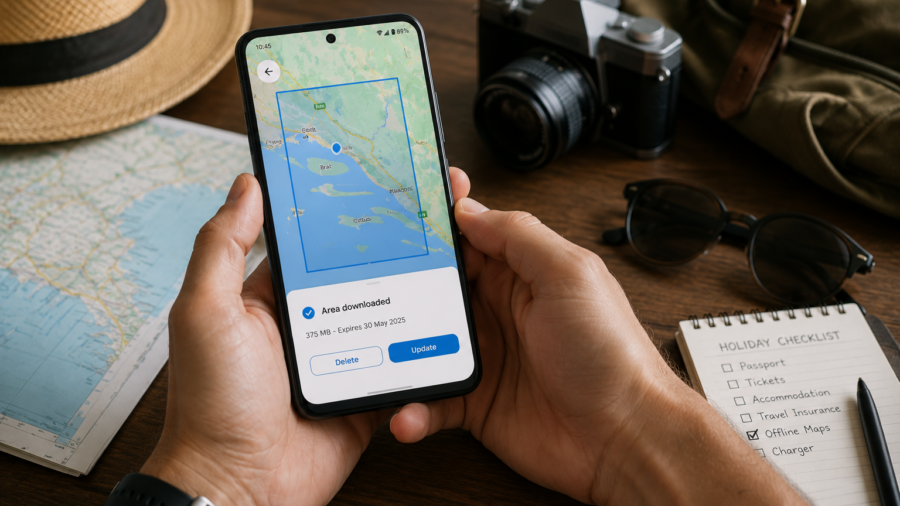
Offline maps are one of the simplest travel tools you can set up before a holiday.
They are not exciting. They do not feel like a luxury travel app. But when you land in a new country, lose signal on a road trip or try to find your hotel without mobile data, they can suddenly become one of the most useful things on your phone.
The idea is simple.
You download the map area before your trip, while you still have a good Wi-Fi connection. Then, if your phone has no internet later, you can still use the saved map for basic navigation and location checking.
This can help with airport arrivals, taxi routes, walking around a new city, finding your hotel, planning day trips and avoiding panic when mobile data does not work as expected.
Offline maps are not perfect. They may not show live traffic, real-time transport changes or the newest business information. But they can make travel much less stressful if you prepare them properly.
Why Offline Maps Matter Before a Holiday
Travel often exposes the weak points in your phone setup.
At home, you may always have mobile data. On holiday, things can change quickly. Roaming may be expensive. A local SIM may not work immediately. Hotel Wi-Fi may be slow. Rural areas may have weak signal. Airports can be confusing. Mountain roads, beaches, small towns and border areas may not have reliable coverage.
That is where offline maps help.
They give you a backup. Even if your internet connection fails, you can still see the saved area, check where you are and find your way around.
This is especially useful for first-time visitors to a destination. If you do not know the city, the roads or the language, having a saved map can make the trip feel more controlled.
Offline maps are not only for remote adventures. They are useful for ordinary city holidays too.
Download Maps Before You Leave Home
The best time to download offline maps is before you travel.
Do it while you have strong Wi-Fi, enough battery and time to check everything calmly. Do not wait until you are already at the airport or standing outside your hotel with a weak signal.
Open your preferred map app and download the area where you will stay.
If you are visiting one city, download the city center and nearby neighborhoods. If you are taking day trips, download those areas too. If you are driving between destinations, make sure the route area is covered, not just the final city.
It is better to download slightly more than you think you need, as long as your phone has enough storage.
A map that stops just outside the area you need can become frustrating.
Choose the Right Area Size
Offline maps take storage space, so area size matters.
If you download a very large region, it may use more storage than necessary. If you download too small an area, you may lose map coverage when you leave the city center.
Think about your real travel plan.
For a city break, download the airport area, your hotel area and the main neighborhoods you plan to visit. For a beach holiday, download the resort area, nearby town, airport route and any day trip locations. For a road trip, download every major part of the route.
If you are not sure, create more than one offline map.
For example, you might save one map for the city, one for the airport area and one for a day trip region.
This keeps the setup more organized and easier to update later.
Use Wi-Fi and Check Storage
Offline maps can be large, especially for big cities or wide travel regions.
Use Wi-Fi when downloading. This avoids wasting mobile data before your holiday even begins. Also check your phone storage before downloading several maps.
If your phone is already almost full, offline maps may not download properly or may make storage problems worse.
Before a trip, it is smart to clean up old downloads, large videos, duplicate photos and unused apps. This gives your phone space for maps, travel documents, photos and messages.
A phone with no storage left is stressful on holiday.
Offline maps are useful, but they need room to work.
Update Maps Before You Travel
Downloaded maps can expire or become outdated.
Before leaving, open your map app and check whether your offline maps are still available and updated. If the app shows an update option, update the maps while you are still on Wi-Fi.
This matters because roads, businesses and place details can change.
Offline maps do not always include the newest information, but updating them before a holiday gives you a better chance of having accurate map data.
If your trip is long, check whether the app can auto-update offline maps when connected to Wi-Fi. This can help keep saved areas fresh during the journey.
Do not assume a map you downloaded months ago is still ready.
Save Important Places
Offline maps work better when you also save key places.
Before your trip, save your hotel, airport, train station, bus terminal, car rental office, attractions, restaurants, beaches, hospitals or meeting points.
This is useful because searching offline may be more limited than searching online. If important places are already saved, they are easier to find later.
Your first saved place should usually be your hotel or accommodation.
If you arrive tired, with low battery or weak signal, you do not want to search through emails for the address. Save it in your map app before you travel.
You can also take screenshots of key addresses as a backup.
Do Not Rely Only on Live Search
When online, map apps can search huge databases of businesses, reviews, opening hours and live information.
Offline, the experience may be more limited.
You may still be able to search some places inside the downloaded area, but not everything will work exactly as it does online. Live traffic, temporary closures, real-time transit updates and the latest opening hours may not be available.
That is why preparation matters.
Save key locations ahead of time. Write down hotel addresses. Keep important booking details offline. Download tickets or PDFs. Do not rely only on live search when traveling.
Offline maps are a backup tool, not a full replacement for every online travel feature.
Check Directions Before You Lose Signal
If you are heading somewhere important, check the route while you still have internet.
This is especially useful for airport transfers, rental car routes, bus stations, train changes, ferry ports and day trips.
Look at the route, travel time and main roads before leaving Wi-Fi. If possible, start navigation while you still have a connection. Some apps can continue guiding you using GPS and downloaded map data, depending on the route and app features.
Even if navigation does not work perfectly offline, seeing the route ahead of time helps you understand the general direction.
This can prevent panic if mobile data drops halfway.
Know the Limits of Offline Navigation
Offline maps are useful, but they have limits.
Live traffic may not work. Public transport updates may be missing or limited. Walking and cycling details may vary by app and region. Business hours, ratings and temporary closures may not be current. Some routes may not update if you miss a turn.
GPS can still show your location without mobile data, but your phone may be slower to load details if the map area was not downloaded properly.
This is why offline maps should be part of a wider travel plan.
Use them with saved addresses, screenshots, travel documents and common sense. If you are driving in an unfamiliar area, check the route before leaving and avoid depending completely on one app.
A backup map is helpful, but it should not be your only plan.
Download Maps for Day Trips Too
Many travelers download the main city map but forget day trip areas.
This can be a problem.
If you are staying in Antalya and planning to visit Side, Kemer, waterfalls or ancient ruins, download those areas too. If you are staying in a city but taking a train to another town, save that destination. If you are driving to beaches, villages or mountain areas, make sure those routes are covered.
Offline maps are most useful in exactly the places where signal may become weaker.
Do not only download the area around your hotel.
Think about where you will actually go.
Keep Battery Life in Mind
Offline maps can help without internet, but they still use battery.
Navigation, GPS, screen brightness and background activity can drain your phone during travel. If you rely on your phone for maps, tickets, payments and communication, battery life matters.
Before a day out, charge your phone fully. Carry a power bank if you will be away from your hotel for many hours. Lower screen brightness when possible. Close apps you do not need. Use battery saver mode if necessary.
A downloaded map is not helpful if your phone dies.
Travel navigation is about preparation, and battery is part of that preparation.
Use Offline Maps With Travel Documents
Offline maps work best when combined with other offline travel tools.
Save your hotel confirmation, flight details, passport copy, travel insurance, rental car booking, tour tickets and important addresses in a place you can access without internet.
You can keep them in a files app, notes app or secure document storage app. Screenshots can also help for quick access, but sensitive documents should be stored carefully.
If you have your address, booking reference and map area saved offline, arriving in a new place becomes much easier.
Do not let one missing internet connection block your whole plan.
Check Both Google Maps and Apple Maps If Needed
Many travelers use Google Maps, but iPhone users may also have Apple Maps available.
Both can be useful, depending on destination, device and personal preference. Some users like one app for driving and another for walking or saved places. Others prefer to keep one as a backup.
If your trip is important, consider setting up offline maps in more than one app.
This gives you another option if one app behaves unexpectedly or if a downloaded area does not work as expected.
You do not need to use multiple apps every day. But having a backup can be useful when traveling.
Common Mistakes to Avoid
One common mistake is downloading the map too late.
Another is downloading only the hotel area and forgetting the airport, day trips or routes between places.
Some travelers forget to update offline maps before leaving. Others run out of storage and do not notice that the map did not download completely.
Another mistake is assuming offline maps include everything online maps show. Live traffic, updated business hours and real-time transit information may not be available offline.
Finally, many people forget battery. A map app, even offline, still needs power.
Avoiding these mistakes makes offline maps much more reliable.
Quick Offline Map Checklist
Before your holiday, check these basics:
Download your hotel area
Download the airport area
Download day trip destinations
Save important places
Update maps before leaving
Use Wi-Fi for downloads
Check phone storage
Keep a power bank if needed
Save travel documents offline
Take screenshots of key addresses
Test the map before the trip
This checklist takes only a few minutes, but it can save a lot of stress later.
Final Takeaway
Offline maps are one of the easiest travel tools to prepare before a holiday.
They help when mobile data is weak, roaming is expensive, Wi-Fi is unreliable or you simply want a backup in an unfamiliar place.
Download your maps before leaving home. Choose the right area size. Save important places. Update maps before travel. Check routes before losing signal. Remember that offline maps may not include live traffic or the newest business information.
A good offline map setup does not replace all travel planning, but it makes your phone much more useful when the internet stops cooperating.
For a calmer holiday, set up offline maps before you need them.





Comments
You can write your views about this story. Comments may be moderated according to site settings.