
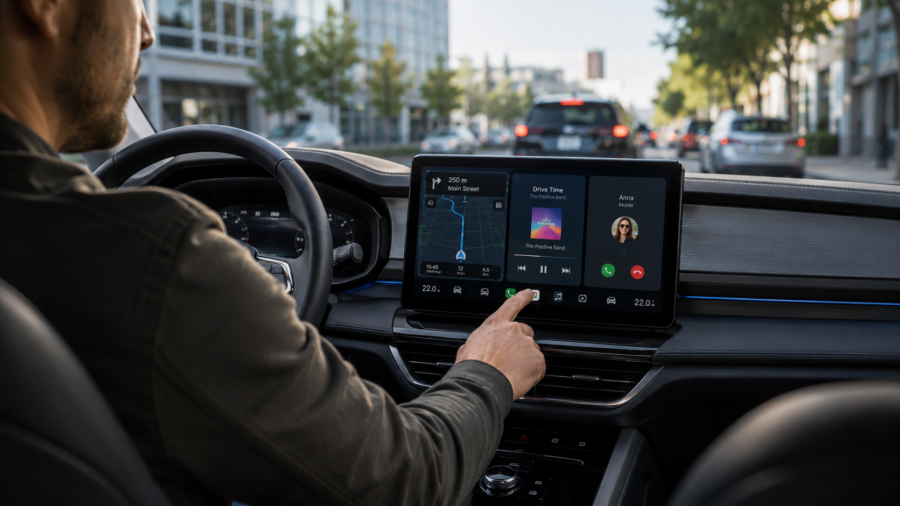
Car infotainment systems used to feel like a bonus feature.
If the radio worked, the screen showed a map and Bluetooth connected most of the time, many drivers were satisfied. The screen was useful, but it did not define the whole car.
That has changed.
In many modern vehicles, the infotainment system is now the center of the driving experience. It handles navigation, music, phone calls, messages, climate settings, driver profiles, parking cameras, charging information and sometimes even basic vehicle controls.
That means a car can have a strong engine, comfortable seats and good efficiency, but still feel frustrating if the screen is slow, confusing or distracting.
For drivers shopping for a new car, the infotainment system is no longer a small detail. It is something worth testing carefully before buying.
Why Infotainment Has Become So Important
Modern cars are becoming more digital.
Large screens are now common even in mainstream vehicles. Electric cars depend heavily on software to show range, charging stops and battery information. Connected cars use online services for maps, traffic, voice assistants and updates. Many drivers also expect Apple CarPlay or Android Auto to work smoothly.
This makes the dashboard screen more important than ever.
A good infotainment system can make daily driving easier. It can guide you through traffic, play music, connect calls safely, show parking cameras clearly and help you understand the car’s settings.
A bad system can do the opposite.
If the menus are confusing, the screen is laggy or simple tasks take too many taps, the car can feel annoying every day. This matters because infotainment is not something you use once in a while. Many drivers interact with it every time they start the car.
The Touchscreen Problem
Touchscreens look modern, but they are not always easier to use.
A large, clean display can make a dashboard feel premium. It can also reduce the number of physical buttons and create a simpler-looking interior. But when too many controls move into the screen, everyday tasks can become harder.
Changing temperature, adjusting fan speed, switching drive modes or opening basic settings should not feel like using a complicated tablet while driving.
This is one reason many drivers still like physical buttons and knobs for common controls. A volume knob, temperature dial or defrost button can often be used by feel, with less time spent looking away from the road.
The best car interiors usually combine both approaches.
Screens are good for maps, media, cameras and detailed settings. Physical controls are still useful for quick actions that drivers need often.
A car does not become better simply because it has fewer buttons.
Why Distraction Matters
Infotainment systems need to be useful without pulling too much attention away from driving.
This is the main challenge.
Navigation, music and phone integration can reduce distraction when designed well. For example, a clear map and voice guidance can help a driver avoid holding a phone. But if the system requires too many taps, unclear menus or long glances, it can create a different kind of distraction.
The safest interface is usually the one that is simple, predictable and easy to interrupt.
Drivers should not need to study the screen to perform basic tasks. Important controls should be easy to find. Text should be readable. Menus should not be overloaded. Voice control should work well enough to be useful, not just impressive in a demo.
A good infotainment system respects the fact that the driver’s main job is still driving.
Apple CarPlay and Android Auto Changed Expectations
Apple CarPlay and Android Auto changed what many drivers expect from a car screen.
People are used to their phones. They know their maps, music apps, contacts and voice assistants. When a car’s built-in system feels worse than a phone, drivers notice quickly.
That is why phone projection systems became so popular.
They give drivers a familiar interface and reduce the need to learn a completely new system in every car. They can also keep apps updated through the phone rather than depending only on the automaker.
However, phone projection is not perfect.
Some vehicles have connection problems. Some systems are wireless, while others require a cable. Some built-in car features may not work fully inside CarPlay or Android Auto. Electric vehicle charging and battery route planning may also work better in the car’s own system, depending on the model.
The best setup is not always phone-only or car-only. It is the system that works reliably for the driver’s real needs.
Built-In Systems Are Getting Smarter
Automakers are improving their own built-in infotainment systems.
This is especially important for electric vehicles. A good built-in system can show battery range, charging stops, route planning, charger availability and energy use in a way phone apps may not fully understand.
Some built-in systems also support over-the-air updates, app stores, voice assistants and driver profiles. In software-defined cars, the infotainment system becomes part of a larger digital platform.
That can be useful, but only if the software is well designed.
Drivers do not benefit from a smart system if it is slow, buried in menus or difficult to understand. A car’s built-in software should make the vehicle easier to use, not just add more features.
Smart does not always mean simple.
EVs Make Infotainment Even More Important
Electric cars have made infotainment systems more important because EV drivers need more real-time information.
Range estimates, charging speed, battery percentage, charging station locations and route planning all matter. A good EV screen can help drivers understand when to charge, where to stop and how much battery they may have when they arrive.
This can reduce range anxiety.
A poor EV interface can make the same car feel more stressful. If the range estimate is unclear or the charging route planner is weak, drivers may feel less confident on longer trips.
For EV buyers, the infotainment system is not just entertainment. It is part of the vehicle’s practicality.
A strong battery and fast charging are important, but the software that explains them to the driver also matters.
What Makes a Good Infotainment System?
A good infotainment system should feel fast, clear and predictable.
The screen should respond quickly. The main menu should be easy to understand. Common tasks should not require too many steps. Important information should be visible without clutter.
Phone pairing should be simple. Apple CarPlay and Android Auto should connect reliably. Voice control should understand normal commands. Navigation should be clear, especially in unfamiliar areas.
For EVs, charging information should be easy to read. For all cars, climate and safety-related settings should be easy to access.
Good design is not about having the biggest screen.
It is about making the right information easy to use at the right time.
What Makes a Bad System?
A bad infotainment system often fails in small daily ways.
It may take too long to start. It may freeze or lag. It may disconnect from the phone. It may hide simple controls behind several menus. It may use tiny icons that are hard to tap while driving. It may look impressive in photos but feel frustrating in real life.
Some systems also overload the driver with too many options.
A dashboard should not feel like a settings menu from a computer. Drivers need clarity, not complexity.
Another problem is moving too many basic functions into the screen. If adjusting airflow, opening the glovebox or changing a simple comfort setting requires menu navigation, the design may be more stylish than practical.
The best test is simple: can you use the system without thinking too much?
What to Check During a Test Drive
Before buying a car, spend real time with the infotainment system.
Do not only drive the car around the block. Sit in the vehicle and test the screen like you would use it every day.
Connect your phone. Try Apple CarPlay or Android Auto if you use them. Enter a destination in the navigation system. Adjust the temperature. Change the radio or music source. Use the parking camera. Try voice control. Look for the settings you would use often.
If the car is electric, test the charging and range screens. See whether the route planner can find chargers. Check whether battery information is clear.
Also pay attention to physical controls. Are there buttons for volume, temperature, defrosting and hazard lights? Are they easy to reach? Can you use them without looking down for too long?
A test drive should include the screen because the screen is now part of the car.
Why Automakers Need to Get This Right
Infotainment is becoming a major quality issue because drivers interact with it constantly.
Automakers can no longer treat software as an afterthought. A beautiful interior can be ruined by a frustrating screen. A good EV can feel less practical if the charging software is weak. A premium car can feel cheap if its interface is slow.
This is why software teams, user experience designers and technology partners are becoming more important in the automotive industry.
The winning brands will not only build cars that drive well. They will build cars that are easy to live with digitally.
That does not mean every car needs a giant screen or dozens of apps. In many cases, the opposite is true. The best systems may be the ones that stay simple, stable and focused on what drivers actually need.
Final Takeaway
Car infotainment systems matter more than ever because they now shape the daily driving experience.
They control navigation, music, phone connection, cameras, climate settings, EV charging information and many connected services. When they work well, they make the car feel modern and easy. When they work poorly, they become a daily frustration.
Drivers should treat infotainment as part of the car’s real quality, not just a feature list item.
Before buying, test the screen, phone connection, physical controls, navigation, voice control and settings. Make sure common tasks feel simple. Check that the system supports how you actually drive.
The future of cars is becoming more digital, but the goal should remain simple: technology should help the driver, not get in the way.

Comments
You can write your views about this story. Comments may be moderated according to site settings.