

Ad viewability sounds like a technical advertising term, but the idea is simple.
An ad has more value when real users can actually see it.
For website publishers, this matters because ads that load far below the page, appear in weak positions or disappear before readers reach them may not perform well. But improving ad viewability does not mean placing ads everywhere or blocking the article.
That is where many publishers make a mistake.
They try to increase ad visibility by adding more banners, popups, sticky blocks and interruptions. Sometimes revenue rises briefly. But if the page becomes harder to read, visitors may leave faster. Over time, that can hurt traffic, trust and long-term monetization.
A better approach is to make ads visible at natural moments.
Good ad placement should support the reading experience, not fight it.
Disclosure: This article contains a sponsored affiliate link. If you register through the link below, we may receive a commission at no extra cost to you.
Start Monetizing With Adsterra
What Ad Viewability Means
Ad viewability is about whether an ad has a real chance to be seen by a visitor.
If an ad loads at the bottom of a long page and most readers never scroll that far, its viewability may be weak. If an ad loads slowly after the reader has already moved past it, the placement may also perform poorly.
But viewability is not only about position.
It also depends on page speed, layout stability, screen size, ad format, reader behavior and content length. A placement that works well in a long article may feel excessive in a short post. A desktop sidebar ad may disappear or move awkwardly on mobile.
For publishers, the practical question is simple:
Can readers see the ad without feeling that the ad is blocking the content?
That balance is the real goal.
Why More Ads Are Not Always Better
Adding more ads may seem like the easiest way to increase revenue.
But more ads can reduce the quality of the page.
If ads appear too often, readers may stop trusting the site. If ads slow the page, visitors may leave before reading. If ads interrupt the first screen, search and Discover visitors may go back quickly.
This can damage the traffic that the website depends on.
A page with fewer, better-placed ads can sometimes perform better than a crowded page. Readers may stay longer, scroll more and visit additional articles. That creates more sustainable monetization than forcing every possible ad unit into one page.
Ad viewability should improve because the page is better structured, not because the reader is trapped.
Protect the First Screen
The first screen is one of the most important parts of any article.
When a visitor lands on a page, they should quickly see the headline, the topic and the beginning of the content. If the first screen is dominated by ads, empty ad containers or popups, the page can feel low quality.
This is especially risky on mobile.
A small screen gives publishers less room to work with. A large ad above the content may push the article too far down. A popup may cover most of the screen. A sticky unit may make scrolling feel cramped.
A safer approach is to let the article begin first.
Place the first ad after the opening section or after a few paragraphs. This gives the reader value before the first monetization moment.
Content should earn attention before ads ask for it.
Place Ads at Natural Breaks
The best ad placements often appear at natural pauses.
A long article usually has sections. Those section breaks are useful because readers already pause mentally before moving to the next idea. An ad placed between two sections can be visible without feeling random.
For example, an ad can work well:
after the introduction
between two major H2 sections
after a practical checklist
near the end of a long guide
before related articles
Avoid placing ads in the middle of a short paragraph or between a heading and its first sentence. That can break the reading flow.
The ad should feel like part of the page structure, not an interruption dropped into the article.
Match Ad Density to Article Length
Ad density should depend on content length.
A 1,500-word guide can usually support more placements than a 400-word update. A short article with several ads may feel thin and overloaded. A long article with only one ad may miss monetization opportunities.
A simple starting rule can help.
For short posts, keep ads light. For medium articles, use one placement after the introduction and one later in the article. For long guides, add placements at natural section breaks, but avoid stacking ads too closely.
The reader should never feel that the content exists only to separate ads.
If the page looks like an ad feed with a little text inside, the balance is wrong.
Mobile Viewability Needs Separate Testing
Mobile viewability is different from desktop viewability.
On desktop, a sidebar ad may stay visible while the reader scrolls. On mobile, that same placement may move into the article flow or disappear entirely. A banner that looks modest on desktop may feel large on a phone.
This is why every ad placement should be checked on a real mobile device.
Open the article as a visitor. Scroll through it slowly. Watch whether the ad appears naturally. Check whether it pushes content too far down. Make sure it does not sit too close to buttons, links or menus.
Mobile is often where monetization succeeds or fails.
A placement is not ready until it works well on a phone.
Improve Speed Before Adding More Ads
Page speed affects both readers and ads.
If a page loads slowly, visitors may leave before the content or ads appear. If ads load late, the layout may shift while the reader is scrolling. This creates a frustrating experience and may reduce trust.
Before adding more ad units, check whether the current page is fast enough.
Compress images. Avoid unnecessary scripts. Use a clean theme. Limit heavy plugins. Make sure ads do not delay the main article from appearing.
A fast page gives ads a better chance to be seen because readers stay long enough to see them.
Viewability is not only about where the ad is placed. It is also about whether the page loads smoothly.
Native Ads Can Help When Clearly Labeled
Native ads can improve viewability because they fit more naturally into content pages.
They may appear between sections, near related articles or inside a content feed. When used well, they can be visible without feeling as disruptive as full-screen formats.
But native ads must be clearly labeled.
Readers should know when something is an advertisement or sponsored placement. If an ad looks exactly like an editorial article, users may feel misled.
That damages trust.
A good native placement should be visible, relevant and honest. It should not pretend to be part of the article.
Be Careful With Sticky Ads
Sticky ads can improve viewability because they remain visible while the user scrolls.
But they can also be annoying, especially on mobile.
A sticky ad that takes too much screen space can make reading uncomfortable. If it covers text, buttons or navigation, it becomes a user experience problem. If it is hard to close, it may feel aggressive.
If you use sticky ads, keep them small and easy to understand.
Test them on mobile first. Make sure they do not cover important content. Do not combine too many sticky elements at once, such as a sticky header, sticky footer ad and popup.
Viewability should not come at the cost of readability.
Use Stronger Formats Carefully
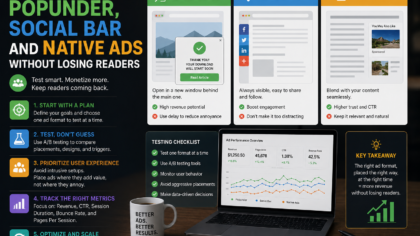
Adsterra offers different ad formats that publishers may test, including native-style placements, banners, Social Bar, Popunder and other options.
Some formats can draw more attention than standard display ads, but stronger formats need stronger limits.
A Popunder or interstitial-style format may work for some traffic types, but it can also frustrate readers if used too early or too often. A Social Bar may perform well on mobile for some sites, but it still needs testing to make sure it does not feel too busy.
The safest strategy is to test one format at a time.
Do not activate every format at once. You need to know what improves revenue and what hurts the page experience.
Avoid Accidental Click Areas
Ad viewability should not rely on accidental clicks.
Do not place ads too close to download buttons, navigation menus, pagination, form fields or important site controls. This is especially important on mobile, where small spacing can lead to mistaken taps.
Accidental clicks may look useful for a moment, but they reduce trust.
Readers should understand what is an ad and what is part of the website. Ads should not imitate system warnings, app buttons or editorial links in a misleading way.
Clean spacing and clear labels protect the user experience.
They also make the site look more professional.
Watch Scroll Depth and Engagement
Revenue is not the only metric that matters.
When improving ad viewability, also watch how readers behave. Do they scroll farther? Do they leave sooner? Do they click related articles? Do they spend enough time on the page? Does mobile behavior change after a new placement?
If a new ad position improves revenue but reduces engagement sharply, the trade-off may not be worth it.
A good placement should improve monetization without making the page weaker.
The best ad strategy protects both revenue and reader behavior.
Use Internal Links to Increase Page Value
Internal links can improve monetization without adding more ads to the same page.
If a reader finishes one article and clicks to a related guide, the session becomes more valuable. The reader gets more helpful content, and the site gets another opportunity to show ads naturally.
This is healthier than overloading one article with too many placements.
For example, a website monetization article can link to guides about ad format testing, mobile traffic, niche traffic and blog monetization planning. These links help the reader continue naturally.
Better session depth can support revenue while keeping each individual page cleaner.
Keep Referral Links Transparent
If you use referral or affiliate links, treat them differently from normal editorial links.
Add a clear disclosure. Use the correct link attributes. Do not hide the commercial relationship. Do not make income promises.
A referral button can be useful when it fits the article topic, but it should not appear randomly across unrelated content.
For example, an Adsterra referral button makes sense inside a website monetization article. It does not belong in a travel guide unless that article is specifically about monetizing a travel site.
Relevance keeps referral links from feeling spammy.
A Simple Viewability Testing Plan
Start with your current layout.
Check which articles get the most traffic. Choose a few long articles for testing. Add or adjust one ad placement after the introduction. Watch mobile layout, page speed, revenue and engagement.
Then test a mid-article placement in longer guides.
If results stay healthy, test a native unit near related content or near the end of the article. Only after that should you consider stronger formats, and only with limits.
The key is patience.
One clean test teaches more than ten random changes.
Final Takeaway
Improving ad viewability is not about placing ads everywhere.
It is about helping ads appear in positions where readers can see them without making the page harder to use.
Protect the first screen. Place ads at natural breaks. Match ad density to article length. Test mobile separately. Keep pages fast. Label native ads clearly. Be careful with sticky, popunder and interstitial-style formats. Watch engagement, not only revenue.
If you want to test Adsterra as part of your website monetization strategy, you can start here:
Start Monetizing With Adsterra
The best ad placement is not the loudest one.
It is the one that earns revenue while keeping readers comfortable enough to stay, scroll and return.





Comments
You can write your views about this story. Comments may be moderated according to site settings.