
Your phone does not need to be the enemy.
It helps you message people, check directions, take photos, manage work, listen to music, follow news and handle daily tasks. The problem is not that phones are useful. The problem is that they often demand attention at the wrong time.
A quick notification becomes a scroll. A five-minute break becomes half an hour. One app opens another app. Before you notice it, your focus is gone.
Many people think the only solution is extreme: delete every social app, switch to a basic phone or force themselves into a strict digital detox.
That can work for some people, but it is not realistic for everyone.
A better approach is to make your phone quieter, more intentional and less tempting without removing everything you use.
Start With Notifications
Notifications are usually the biggest source of phone distraction.
Most apps want permission to interrupt you. Shopping apps want to announce offers. Games want you to return. Social apps want reactions. News apps want attention. Delivery apps, banks, calendars and messaging apps may also send alerts.
Some notifications are useful. Many are not.
Start by turning off notifications from apps that do not need immediate attention. You do not need every promotion, trend, recommendation or reminder on your lock screen.
Keep important alerts such as messages from close contacts, banking security, calendar reminders and delivery updates. Reduce everything else.
This one change can make your phone feel calmer almost immediately.
Turn Off Lock Screen Noise
The lock screen is powerful because it catches your eye before you even unlock the phone.
If every notification appears there, your phone becomes a constant invitation. You may pick it up just to check one alert and then end up opening several apps.
A simple fix is to limit what appears on the lock screen.
You can hide sensitive notifications, remove non-essential apps from the lock screen or allow only important alerts. This makes the phone less visually noisy.
The goal is not to miss everything.
The goal is to stop your lock screen from becoming a feed.
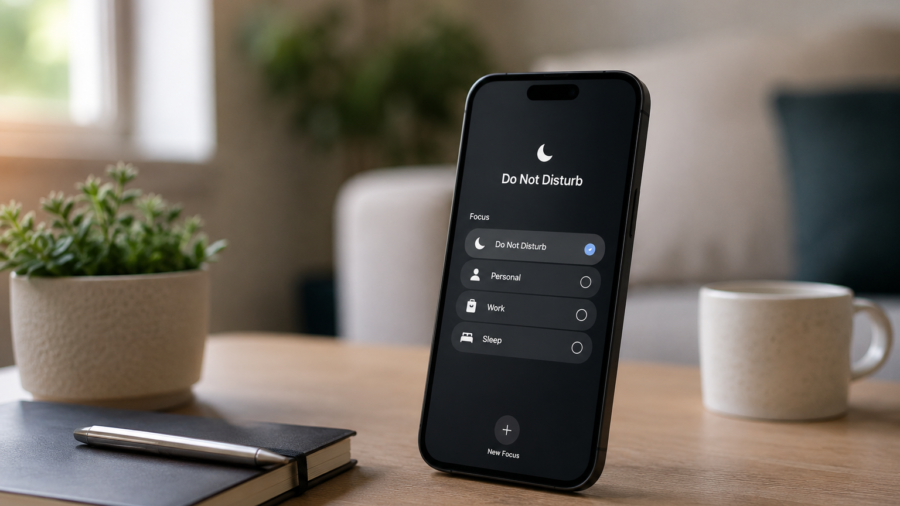
Use Focus Mode or Do Not Disturb
Most modern phones include tools that can pause distractions for a set period.
On Android, Digital Wellbeing tools can help pause distracting apps and set focus routines. On iPhone, Screen Time and Focus settings can help limit interruptions, schedule downtime and control which apps or people can reach you.
These tools are useful because they do not require deleting apps.
You can still keep the apps on your phone. You simply decide when they are allowed to interrupt you.
For example, you might create a focus routine for work, study, sleep or family time. During that period, only important calls or messages come through. Social media, games and entertainment apps stay quiet.
A focus mode works best when it matches your real day.
Do not create a perfect system. Create a simple one you will actually use.
Set App Limits for Your Weak Spots
Most people have one or two apps that take more time than expected.
It may be a social app, a video app, a game, a shopping app or a news feed. You open it for a quick check and lose track of time.
App limits can help.
A daily limit does not need to be harsh. Even a gentle limit can create a pause. When the limit appears, you get a moment to ask: do I actually want more time here, or am I just scrolling automatically?
That pause is valuable.
The goal is not to punish yourself. It is to interrupt the habit before it becomes automatic.
Start with the app that distracts you most, not every app on your phone.
Move Distracting Apps Off the Home Screen
Your home screen should not be a temptation board.
If the most distracting apps are always visible, you will open them more often. Moving them away does not delete them. It simply adds a small layer of friction.
Put distracting apps inside a folder. Move that folder to a second or third screen. Remove widgets that constantly update. Keep only useful daily tools on the first screen.
A cleaner home screen can change how you use your phone.
You are less likely to open an app just because its icon is sitting in front of you.
This is a small change, but it works because it changes the default path.
Stop Using Your Phone as a Filler
Many phone distractions happen in tiny empty moments.
Waiting in line. Sitting in a parked car. Standing in an elevator. Waiting for a page to load. Taking a short break.
The phone becomes automatic filler.
This is not always bad, but it can train your brain to avoid every quiet second. Over time, focusing without checking your phone may feel harder.
Try leaving a few small moments empty.
Do not pull out your phone during every short pause. Let your mind rest for a minute. Look around. Breathe. Think. Do nothing.
Digital life becomes healthier when the phone is not the answer to every gap.
Create Phone-Free Zones
You do not need to ban your phone from your life.
But you can keep it out of certain places or routines.
The bedroom is a good place to start. If your phone is the last thing you see at night and the first thing you touch in the morning, it controls the edges of your day.
Try charging it away from the bed. Use a simple alarm clock if needed. Keep the first ten minutes of the morning free from apps.
You can also create phone-free zones during meals, study sessions, family time or focused work.
The point is not perfection.
The point is to protect a few parts of your day from constant interruption.
Make Boring Apps Easier to Reach
One useful trick is to make helpful apps easier to access than distracting ones.
Put your calendar, notes, maps, reading app, music player, files app or language app on the first screen. Move social feeds and short-video apps farther away.
This changes the phone’s default behavior.
When you unlock it, the first options you see are tools, not traps.
Your phone can still be useful. It just does not need to push the most distracting options first.
A calmer phone layout can support better habits without requiring strong willpower every time.
Use Grayscale When You Need Extra Help
Many phones allow grayscale or color filter settings.
This makes the screen less visually exciting. Bright app icons, badges and colorful feeds become less tempting. The phone still works, but it feels less like entertainment.
Grayscale is not for everyone.
Some people find it too dull. Others find it helpful during work hours or late at night. You can use it only during certain periods if your phone supports that setup.
The idea is simple: reduce the visual reward.
If your phone feels less stimulating, you may pick it up less often.
Check Your Screen Time Without Judging Yourself
Screen time reports can be useful, but only if you use them calmly.
The goal is not to shame yourself. The goal is to understand your habits.
Look at which apps take the most time. Check how often you pick up your phone. Notice when your usage is highest. Is it late at night? During work? Early morning? While watching TV?
Once you know the pattern, you can make a better change.
If late-night scrolling is the problem, set a downtime schedule. If work interruptions are the problem, use focus mode. If one app dominates your day, set a limit or move it off the home screen.
Data is useful when it leads to one practical adjustment.
Turn Off Badges
Notification badges are small but powerful.
A red dot or number on an app icon creates pressure. It tells you something is waiting. Even if the notification is not important, the badge can pull you back into the app.
Turning off badges can make your home screen feel much calmer.
You can still open apps when you choose. You simply remove the visual pressure to check them constantly.
This is especially useful for email, social apps, shopping apps and news apps.
Not every alert deserves a number on your screen.
Make Checking Intentional
Instead of checking apps randomly all day, create intentional check-in times.
For example, you might check messages at natural breaks, email a few times a day, news once in the morning and once in the evening, or social apps only after work.
This reduces constant switching.
Random checking breaks focus because your mind keeps returning to the phone. Scheduled checking gives your attention more room.
You do not need a strict timetable.
Even a loose habit helps: “I will check this later, not every time I feel bored.”
Do Not Try to Fix Everything at Once
The biggest mistake is trying to change every phone habit overnight.
That usually fails.
Start with one change. Turn off unnecessary notifications. Then clean your home screen. Then set one app limit. Then create one focus routine.
Small changes are easier to keep.
If your phone becomes even 20% less distracting, that is already useful. You do not need a perfect digital life to feel more in control.
The goal is progress, not purity.
When Deleting an App Does Make Sense
You do not need to delete every app, but sometimes deleting one app is the right move.
If an app repeatedly wastes your time, affects your mood, encourages impulse spending or makes it hard to sleep, removing it may be simpler than trying to manage it.
You can also try a temporary deletion.
Remove the app for a week and see what changes. If you genuinely miss something useful, reinstall it later. If life feels calmer without it, you have your answer.
Deleting an app is not failure.
It is just one tool.
Final Takeaway
Reducing phone distractions does not mean deleting every app or rejecting modern life.
It means making your phone work on your terms.
Start with notifications. Clean your lock screen. Use focus mode or downtime. Set limits for your most distracting apps. Move them off the home screen. Create phone-free zones. Check screen time without judgment. Make app use intentional.
Your phone can still be useful, fun and connected.
It just does not need to interrupt you all day.
A calmer phone is not about having fewer apps. It is about having more control over when and why you use them.


Comments
You can write your views about this story. Comments may be moderated according to site settings.