
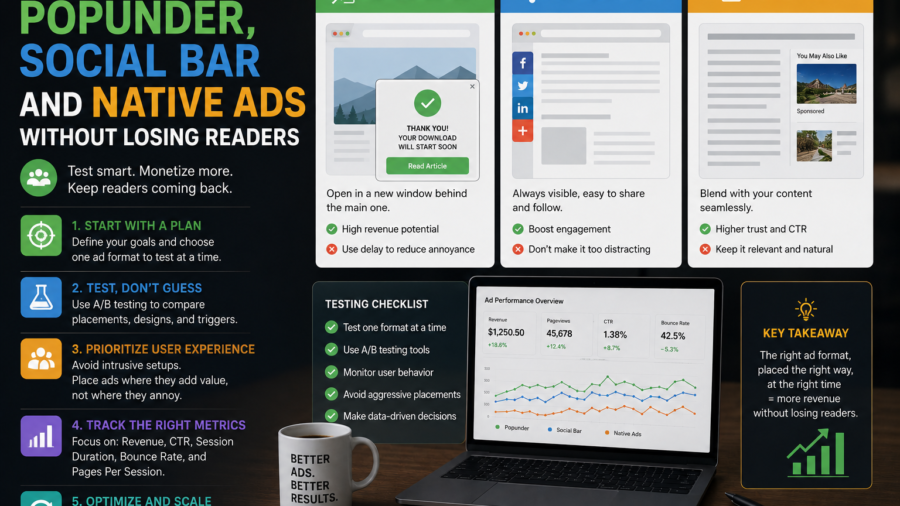
Testing ad formats can help a website earn more from its traffic.
But it can also damage the site if it is done carelessly.
A publisher may add Popunder ads, Social Bar, Native ads, banners or interstitial-style placements hoping to increase revenue. Sometimes the numbers improve. Sometimes the page becomes slower, readers leave faster and the website starts to feel less trustworthy.
That is why ad testing should be treated as a careful process, not a quick switch.
The goal is not to activate every format at once. The goal is to understand which ad format fits your traffic, your content and your readers without making the website harder to use.
Adsterra offers several ad formats publishers may test, including Popunder, Social Bar, In-Page Push, Native, Banner, Interstitial and Smartlink options. Each format behaves differently, and each one can affect user experience in a different way.
The smartest publishers test slowly, measure clearly and protect the reader first.
Disclosure: This article contains a sponsored affiliate link. If you register through the link below, we may receive a commission at no extra cost to you.
Start Monetizing With Adsterra
Why Ad Format Testing Matters
Not every ad format works the same way for every website.
A long tutorial site may perform better with Native or Banner ads placed between article sections. A fast-moving entertainment site may test more attention-driven formats. A mobile-heavy website may need lighter placements because screen space is limited.
Traffic source also matters.
Search visitors often want a clear answer. Discover visitors may be curious but quick to leave. Returning readers may be more sensitive to aggressive ads because they know what the site normally feels like.
This is why copying another publisher’s setup can be risky.
A format that works on one site may hurt another. Your ad strategy should be tested on your own traffic, not assumed from someone else’s case study.
Start With a Baseline
Before testing a new ad format, understand your current numbers.
Look at page views, average engagement, bounce behavior, mobile traffic share, page speed and current ad revenue. You do not need a perfect analytics setup, but you need enough information to compare before and after.
If you add a new format without a baseline, you may not know whether it helped.
For example, revenue may rise but page speed may drop. Or clicks may improve while readers spend less time on the site. Or mobile users may leave faster after a new placement appears.
A baseline helps you avoid guessing.
Write down what the site looks like before the test. Then compare the same pages after the test.
Test One Format at a Time
The biggest mistake is testing too many formats at once.
If you activate Popunder, Social Bar, Native ads and Interstitials on the same day, you will not know which change caused which result.
A better method is simple.
Test one format first. Run it on a limited number of pages. Watch the effect. Then decide whether to keep, adjust or remove it before testing another format.
This makes your decisions cleaner.
If revenue improves and user behavior stays healthy, the format may be worth expanding. If revenue improves but mobile users leave faster, the placement may need limits. If the site feels worse and revenue barely changes, the format may not be worth keeping.
Testing is useful only when you can understand the result.
Native Ads: Start With the Safest Format
Native ads are often a safer starting point because they can fit naturally inside article layouts.
They usually work best when placed between sections, near related content or after the main article. The key is that they should be clearly labeled as ads or sponsored content.
Native ads should not trick readers.
If an ad looks exactly like an internal article card without any label, users may feel misled. That can damage trust.
For a content site, a good Native placement should feel visible but not aggressive. It should not block the title, cover the opening paragraph or interrupt the reader before they understand the article.
Native ads can work well on long guides because there are natural breaks between sections.
Banner Ads: Simple but Still Worth Testing
Banner ads are familiar and easy to understand.
They can appear near the top, inside the article, in the sidebar or near the end of the page. But banner placement still matters.
A banner above the title may push content too far down. A banner inside a short article may make the page feel crowded. A sticky banner on mobile may take too much screen space if it is too large.
Test banners like any other format.
Check whether the banner affects page speed, layout stability and mobile readability. A banner that looks normal on desktop may feel too heavy on a phone.
For many small publishers, one clean in-article banner may be better than several banners competing for attention.
Social Bar: Test Carefully on Mobile
Social Bar is designed to be more interactive than traditional display ads, so it needs careful testing.
It may work well for some websites, especially mobile-heavy sites, but publishers should check how it feels to real users. Does it cover content? Does it distract too much? Does it appear too early? Does it make the page feel noisy?
The best way to test Social Bar is with limits.
Start on a small group of pages. Check the page on a real phone. Watch whether readers still scroll and engage with the article. If the format increases revenue without damaging readability, it may be worth expanding.
If it makes the site feel aggressive, reduce it or try a different placement.
Interactive does not automatically mean better.
Popunder Ads: Use With Extra Caution
Popunder ads can be attention-grabbing, but they are also more sensitive from a user-experience perspective.
A Popunder opens a new tab or window behind the current page. Some publishers use it because it can monetize traffic differently from standard banners. But for some readers, it can feel unexpected or annoying.
This does not mean publishers can never test Popunder ads.
It means they should be careful with timing, frequency and audience.
Do not show Popunder ads too aggressively to every visitor. Avoid repeating them too often in one session. Be especially careful on pages where readers are trying to complete a simple task or get a quick answer.
If a format makes readers feel tricked, the long-term cost may be higher than the short-term revenue.
Interstitial Ads Need Clear Limits
Interstitial ads can interrupt the reader before or during content access.
Because of that, they should be handled carefully. A poorly timed interstitial can make users leave before they read the article. It can also make the site feel lower quality, especially on mobile.
If you test interstitial-style formats, avoid blocking the first screen immediately after landing from search or Discover.
Let the reader see the article first.
Frequency matters too. An interstitial shown once may be acceptable in some contexts. The same interruption repeated on every page can quickly become frustrating.
Interstitial testing should always include mobile checks.
Watch Page Speed During Every Test
Ads can affect page speed.
A new script may delay loading. A heavy creative may slow the page. A late-loading ad may cause layout shift while the reader is scrolling. On mobile, these problems feel even worse.
Before and after each test, check how the page loads.
Does the title appear quickly? Does the article jump as ads load? Does the page become harder to scroll? Does the ad push important content too far down?
A monetization setup that slows the site too much may hurt long-term performance.
A cleaner site with fewer ads can sometimes earn more over time because readers stay longer and view more pages.
Check Mobile Before Desktop
Mobile should come first.
Many publishers design ad placements on desktop because it is easier to work from a computer. But most readers may arrive on phones.
A sidebar ad that works on desktop may disappear or move awkwardly on mobile. A top banner may take up too much vertical space. A pop or overlay may feel much more aggressive on a small screen.
Before keeping any ad format, open the page on a real phone.
Read the article like a normal visitor. Scroll slowly. Tap links. Check whether ads are too close to buttons. Make sure the content remains easy to access.
If the mobile experience feels bad, the setup is not ready.
Use Different Rules for Different Page Types
A long article, short news post, homepage and category page should not always have the same ad setup.
Long articles can usually support more in-content placements because readers spend more time on the page. Short articles need lighter monetization because ads can quickly overpower the text.
Homepages should often stay cleaner because they help users understand the site. Category pages should not feel like ad walls. How-to guides should protect readability because users want direct answers.
Match ad density to page purpose.
The reader should never feel that the article exists only to carry ads.
Track More Than Revenue
Revenue is important, but it is not the only signal.
When testing ad formats, also watch user behavior. Are visitors leaving faster? Are they reading less? Are page views per session falling? Are mobile users behaving differently from desktop users?
Also watch technical signals.
Is page speed worse? Are there layout shifts? Are ads overlapping content? Are any users complaining about pop-ups or redirects?
A format that increases revenue by a small amount but damages every other signal may not be a good trade.
The best ad format is the one that earns without weakening the site.
Set a Test Period
Do not judge a format too quickly.
One day of data may not be enough, especially for small sites. Traffic can vary by weekday, source, country and topic.
Set a reasonable test period. For a small site, this may mean one or two weeks. For a larger site, a few days may show enough early signals.
During the test, avoid making unrelated major changes.
If you change the theme, publish viral content, update ad placements and add a new plugin all at once, the test becomes harder to understand.
Clean testing requires patience.
Keep Sponsored Links Properly Marked
If your article includes referral or affiliate buttons, mark them clearly.
Use a disclosure near the link and add proper attributes such as:
rel="sponsored nofollow noopener"
This helps search engines understand that the link is commercial and helps readers understand the relationship.
Affiliate links can be useful, but they should not be hidden.
Trust is part of monetization. If readers feel the site is honest, they are more likely to return.
Avoid Misleading Ad Placement
Do not place ads where users may click by accident.
Ads should not sit too close to download buttons, navigation controls, forms, pagination links or important site buttons. This is especially important on mobile, where space is limited.
Native ads should be labeled. Banners should not imitate system warnings. Pop formats should not make the page feel unsafe.
A good ad setup is visible but honest.
Long-term revenue should come from real ad value, not user confusion.
A Simple Beginner Testing Plan
A beginner-friendly test plan can look like this:
Start with one Native or Banner placement inside long articles.
Place it after the introduction, not before the reader reaches the content.
Run the test for a reasonable period.
Check revenue, mobile layout, page speed and engagement.
If results are healthy, add one mid-article placement for longer posts.
Only after that, test Social Bar or Popunder formats on a limited group of pages.
Do not rush.
The slower approach gives you better information and protects the site.
When to Remove a Format
Removing an ad format is not failure.
It is part of testing.
Remove or reduce a format if it slows the site, causes layout problems, annoys users, covers content, creates accidental clicks or brings too little revenue to justify the disruption.
A publisher should not keep a format only because it is available.
The best monetization setup is selective.
A few well-placed ads can be better than a crowded page full of formats that hurt the reading experience.
Final Takeaway
Testing Popunder, Social Bar, Native and Banner ads can help publishers improve website revenue, but only when testing is done carefully.
Start with a baseline. Test one format at a time. Check mobile first. Watch page speed. Match ad density to content length. Avoid aggressive interruptions before readers can access the article. Mark sponsored links properly and keep ad placements honest.
If you want to test Adsterra ad formats as a publisher, you can start here:
Start Monetizing With Adsterra
The best ad strategy is not the most aggressive one.
It is the one that helps the website earn while keeping readers willing to stay, scroll and return.






Comments
You can write your views about this story. Comments may be moderated according to site settings.